
Tools: cost and storage calculators
Two calculators, built from Didpop's own published formulas. Here is how to use this calculator: enter real numbers and it computes a real result, it does not look anything up on Didpop's live account system.
Landed-cost estimator
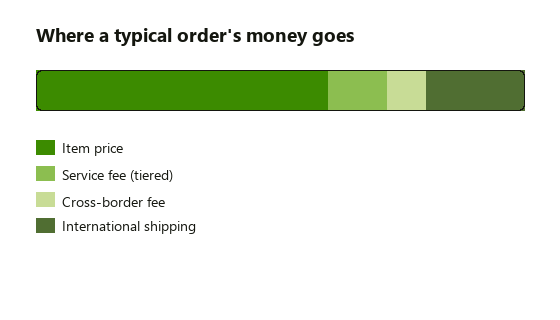
Enter a product price and Didpop's published service-fee rule and card-handling formula are applied to it. International shipping is not included, that is a separate charge paid once the parcel is weighed, see the shipping page.
Worked example: a $40 hoodie from Taobao carries no service fee, so the card charge works out to roughly $41.50 to $42.42 once the cross-border fee is added, before any international shipping. The same $40 item from an unverified storefront picks up a $4 service fee first (10%), pushing the charge to roughly $45.62 to $46.63.
Storage deadline calculator
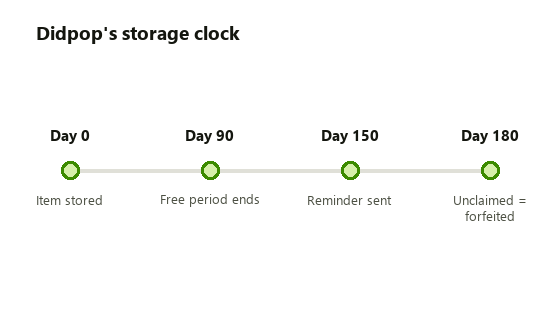
Didpop counts free storage from the day an item is marked stored in your warehouse, not the day you ordered it. Enter that date to see your own deadlines.
Worked example: an item marked stored on January 1 sits free until around April 1 (day 90), gets a reminder around May 31 (day 150), and is treated as abandoned around June 30 (day 180) if it is still unclaimed. Submitting the parcel any time before day 90 avoids the per-day storage fee entirely.
Key points
- Both tools use formulas published in Didpop's own help centre, dated 2026-10-22.
- The cost estimator gives a range, not a false-precise single number, because Didpop's own worked example is not fully consistent about one divisor.
- International shipping is never included in the cost estimate: it is a separate, later charge.
- Neither tool reads your real Didpop account; both are plain arithmetic in your browser.
Why a range instead of one number
Most fee calculators on guide sites print a single confident figure. This one does not, because Didpop's own published materials give two slightly different ways to read the card-fee formula, and presenting one as definitive would be guessing dressed up as precision. The low end of the range assumes the divisor implied by Didpop's worked example; the high end assumes the straightforward 5% reading of the stated rule. Your actual charge will land somewhere in that range, and the only way to know exactly where is to check the total Didpop shows you at checkout before you confirm payment.
What neither tool can do: look up a real exchange rate, check your actual warehouse status, or account for a VIP-tier discount, since this guide could not confirm the thresholds for those tiers (see the glossary). Treat both results as a planning estimate, not a quote.
One caveat before you trust these numbers
Both calculators assume a direct Didpop order. If what you are quoted at checkout routes through the third-party agent layer mentioned on the Didpop page, the fee standard applied can differ from the tiers built into the cost estimator here, so treat a gap between this tool's result and your actual checkout total as a signal to check which fee standard applied, not as a bug in the tool. For the storage calculator, remember the clock starts when an item is marked stored, which is not always the same day the seller shipped it or the day you placed the order, check your own warehouse list for the actual stored date before trusting the deadline shown here.