
Reading Didpop's QC photos
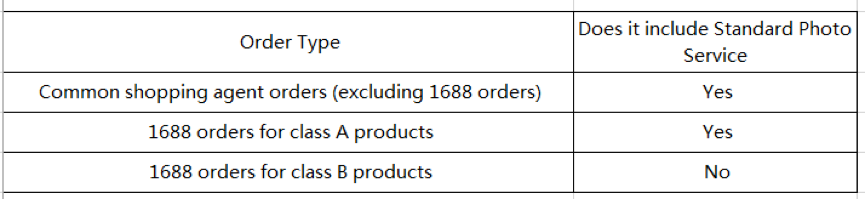
Didpop calls its free check "Standard Inspection and Standard Photo Service". This page covers what it includes, what it does not, and how to read the photos you get back.
What Didpop's QC photos are
Every item gets screened for prohibited goods and checked against the order: style, quantity, colour, size, model, visible damage, and defects, with three standard photos taken as part of that check. Whether the original packaging gets opened for this is your choice at order time; skip it and Didpop can only verify the outside of the box, not the item inside.
A defect threshold is defined, not left vague: stains, discoloration, scratches, snags, or folds are flagged if they are over 0.5cm across for round marks or over 1cm for other shapes. Smaller marks than that are not guaranteed to be called out.
Making sense of three photos
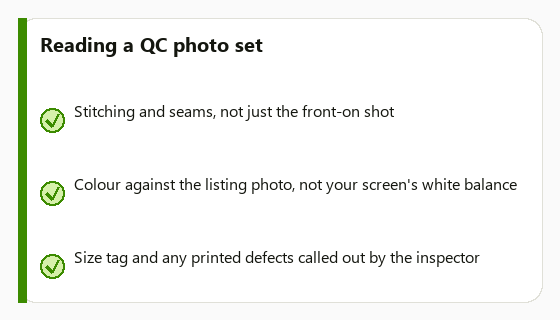
A short QC checklist for reading the photos Didpop sends back: start with the size tag and the model or SKU details against what you ordered, that is the fastest way to catch a seller mix-up. Then check the three standard shots for anything the listing photos did not show: a loose thread, an off colour under warehouse lighting, a scuff near a seam.
Three photos will not cover every angle. If stitching on the inside of a hem or a specific pocket matters to you, that is exactly the gap the paid Detailed Photo or Detailed Inspection add-ons exist to close, ask for it before the item leaves the warehouse, not after.
What QC cannot tell you
Didpop is explicit about the limits here. Seller-declared defects, subjective quality differences, and things like how a phone case actually fits your specific phone model are outside the scope of standard inspection. Electronics and appliances are checked for external condition only, inspectors do not power devices on, so a dead unit will not be caught unless you buy the separate 3C and appliance power inspection add-on.
If the QC photos do show a real problem, stains, wrong item, visible damage, Didpop's help centre documents a standard process for handling defective or quality-disputed products rather than leaving it to case-by-case negotiation. Raise it while the item is still in the warehouse and before you submit the parcel; once it has shipped, your options narrow to the return and exchange process described on the ship-and-receive stage.
Key points
- Three free standard photos per item, plus a prohibited-goods and condition check.
- You choose at order time whether packaging is opened; skipping it limits what Didpop can verify.
- Electronics are checked externally only; devices are not powered on under standard inspection.
- Want more angles or a powered-on check? Those are separate, paid add-ons requested before shipping.
Reading QC photos across different product types
A size tag check matters most for apparel; for bags and accessories, the standard three shots are more useful for catching hardware defects (a loose clasp, a scratched buckle) than colour accuracy, since warehouse lighting is not studio lighting. For electronics, remember the inspection only confirms the box contents and exterior match the order, not that the unit powers on, budget for the 3C inspection add-on separately if that matters. For anything with a printed or embroidered logo, check the placement and spelling against the listing photo specifically, that is a detail a rushed glance at three photos is most likely to miss.