
The full Didpop order guide, in three stages
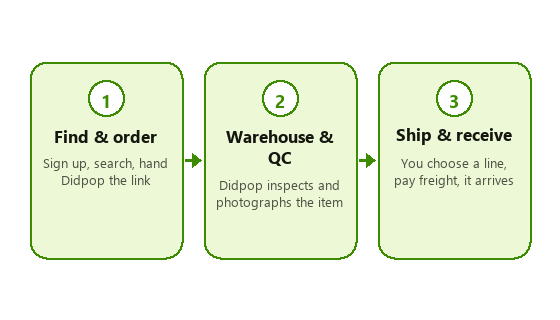
From a product link to a parcel on your doorstep, a Didpop order moves through three stages. Each has its own page below with the real screenshots this guide could capture, and a plain note where it could not.
How to use Didpop and Didpop Spreadsheet together
This site only does the first half of stage one: finding something worth buying. The moment you have a link, everything else, paying, QC, warehouse, shipping, happens on Didpop's own site. Treat this guide as the manual for that second half, written from Didpop's own help centre and reorganised into the order things actually happen in, rather than the loose topic list the help centre uses.
Shopping agent or parcel forwarding: two different starting points
Didpop's help centre actually splits into two related services, and which one applies to you changes where your order starts. The shopping agent path is what this guide covers in detail: you hand Didpop a link, Didpop buys the item, and the rest follows the three stages above. The separate parcel forwarding path is for shoppers who already bought something directly from a seller and only need Didpop to receive it at its warehouse address and forward it onward, no purchase step involved. Didpop's help centre keeps dedicated guidance for each, "User Guidance for Shopping Agent" and "User Guidance for Forwarding", under separate categories, because the account steps, fees, and inspection rules differ slightly between the two.
If you are not sure which applies: if Didpop is placing the order, you are using the shopping-agent path. If you already have a tracking number from a seller and just need an address to ship it to, that is forwarding, and some details on this guide (like the service-fee tiers on the fees page) apply only to agent orders, not plain forwarding.
Have these ready before stage one
- An email address for the account, no Chinese phone number required.
- A product link, or enough of a product name and photo to search with on the category shelf.
- A card or PayPal that can be charged in USD, since that is the currency Didpop settles in regardless of the listing's original currency.
- Patience for the warehouse stage: free storage runs up to 90 days, but most shoppers submit a parcel well before that if they are only waiting on one or two items.
One more thing worth knowing before stage one: Didpop's own order list uses named statuses as an order moves through the system, Payment Pending, Purchasing, Confirm or Back-Payment, Warehouse Pending, and eventually Stored in warehouse, so if you check back on an order and see a status rather than a finished item, that is normal progress, not a stall. The first stage page covers what each status means and the two most common reasons an order can get stuck on one.
Key points
- Stage one: sign up, search, submit a link. No account fee to open one.
- Stage two: Didpop buys and inspects the item, then it sits in free storage for up to 90 days.
- Stage three: you choose a shipping line, pay freight, and track delivery.
- No official walkthrough video exists at the time of writing; the slot above is left for one.